
a User-Friendly Interface, AKA User interaction (UI) plays a key role in the success of any digital product. An intuitive interface is integral for attracting customers, and offering them a straightforward way to engage and use your product or service. In this write-up, we will touch on what’s needed to create an intuitive interface and the major components that ensure its effectiveness.
Understanding User Needs and Goals
Before beginning the design process, conducting discovery sessions to understand the needs and goals of your target audience is essential. This can involve sessions such as user research and gathering insights into their preferences, behaviors, and pain points. By understanding your users, you can design an interface that meets their needs and provides a positive experience.
Conducting User Research

User research can take various forms, such as surveys, interviews, and usability testing. Surveys can help gather quantitative data on user preferences and behaviors, while interviews provide more in-depth insights into their needs and goals. Usability testing involves observing users as they interact with a prototype or existing product to identify any usability issues.
Creating User Personas
User personas are fictional representations of your target audience based on the insights gathered from user research. They help designers understand the needs, goals, and behaviors of their users and guide the design process. By creating user personas, designers can ensure that the interface caters to the needs of their targeted audience.
Information Architecture and Navigation
Information hierarchy is the procedure of arranging and structuring data in a manner that is simple for users to grasp and navigate. It requires the formation of an information hierarchy and deciding how it will be shown to users. A well-constructed information hierarchy is vital for a user-friendly interface since it enables users to swiftly and effortlessly locate the information they’re looking for.
Creating a Hierarchy of Information
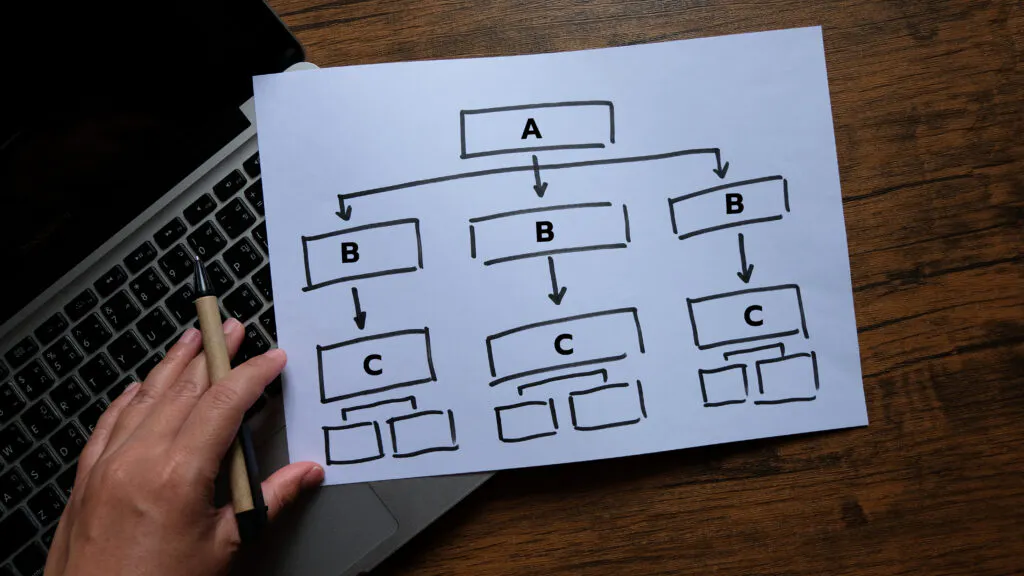
The first step in creating an effective information architecture is determining the most important information and how it should be organized. This involves creating a hierarchy of information, with the most critical information at the top and less important information at the bottom. This hierarchy should be based on the needs and goals of your target audience.
Designing Navigation
The navigation component is essential for a user-friendly interface since it enables users to transition between various parts of the product or service. When designing navigation, it is imperative to keep it simple and intuitive. Users should be able to find what they are looking for without having to think too much about where to find it. This can be achieved by using clear labels, consistent placement, and familiar design patterns.
Visual Design and Branding
Design plays a significant role in creating a user-friendly interface. It involves the use of colors, typography, and imagery to create a visually appealing, cohesive, and intuitive design. Visual design also helps to establish the brand identity and create a memorable experience for users.
Choosing a Color Scheme

When choosing a color scheme for your interface, it is essential to consider the emotions and associations that different colors evoke. For example, blue is often associated with trust and professionalism, while red can evoke feelings of excitement and urgency. Make sure that the color scheme is consistent with the brand identity and does not clash with any existing branding, especially competitors.
Selecting Typography
Typography affects the readability and overall aesthetic of the interface. When choosing typography, it is essential to consider the readability, legibility, and hierarchy of information. Sans-serif fonts are often used for digital interfaces, as they are easier to read on screens. It is also important to ensure that the typography is consistent throughout the interface.
Incorporating Branding
Branding is an essential aspect of any product or service, and it should be incorporated into the interface design. This can be achieved through the use of logos, brand colors, typography, icons and other visual elements that are consistent with the brand identity. By incorporating branding into the interface, users can easily recognize and connect with the brand.
Prototyping and Testing
Prototyping and testing are important steps in the design process, as they allow designers to gather feedback and make improvements before the final product is released. Prototyping involves creating a basic version of the interface, which can be tested by users to identify any usability issues. Testing can take various forms, such as usability testing, A/B testing, and click testing.
Usability Testing

Usability testing involves observing users as they interact with a prototype or existing product to identify any usability issues. This can be done in person or remotely, and it allows designers to gather feedback on the interface’s usability and make improvements before the final product is released.
A/B Testing
A/B testing involves creating two versions of the interface and testing them with different groups of users to determine which one performs better. This can help designers make data-driven decisions and improve the interface’s effectiveness.
Click Testing
Click testing involves presenting users with a prototype or mockup and asking them to click on specific elements to complete a task. This can help identify any usability issues and determine the effectiveness of the interface’s design.
Continuous Improvement
The design process does not end once the interface is released. Continuous improvement is necessary for maintaining a user-friendly interface and meeting the evolving needs of users. This involves gathering feedback, analyzing data, and making improvements based on user behavior and preferences.
Gathering Feedback

Gathering feedback from users is an essential part of continuous improvement. This can be done through surveys, interviews, and user testing. By gathering feedback, designers can identify any issues or areas for improvement and make changes to enhance the user experience.
Analyzing Data
Data analysis is a must for understanding how users interact with the interface and identifying any areas for improvement. This can involve tracking user behavior, such as clicks and page views, and using analytics tools to gather insights on user preferences and behaviors.
Making Improvements
Based on the feedback and data gathered, designers can make improvements to the interface to enhance the user experience continually. This can involve making changes to the information architecture, navigation, visual design, or any other elements that may impact the user experience. In the video below I will walk you through our 3 main principles on how we approach design challenges here at Kingsmen.
Conclusion
Designing a user-friendly interface involves understanding user needs and goals, creating an effective information architecture, incorporating visual design and branding, and continuously improving based on feedback and data. By following this process, designers can create interfaces that are intuitive, visually appealing, and meet the needs of their target audience. See how else we can help your company here, or reach out to our dev team today!
Frequently asked questions
Start by understanding the needs and goals of your target audience through discovery sessions and user research. Research methods include surveys for quantitative data on preferences and behaviors, interviews for deeper insight into needs and goals, and usability testing to observe how people use a prototype or existing product. Insights from this research are often turned into user personas, fictional representations of your audience that guide design decisions.
Begin with a clear information hierarchy, placing the most critical information at the top based on your audience’s needs and goals. Keep navigation simple and intuitive so users can find what they want without having to think about where it is. Clear labels, consistent placement, and familiar design patterns all help.
Consider the emotions colors evoke; for example, blue is often associated with trust and professionalism, while red can suggest excitement and urgency. Keep the color scheme consistent with your brand and avoid clashing with existing branding, especially competitors’. For typography, prioritize readability, legibility, and information hierarchy, and keep it consistent; sans-serif fonts are often used on screens because they are easier to read.
Usability testing observes users interacting with a prototype or product, in person or remotely, to uncover usability issues. A/B testing compares two versions of the interface with different user groups to see which performs better, supporting data-driven decisions. Click testing asks users to click specific elements in a prototype or mockup to complete a task, revealing how effective the design is.
No, continuous improvement is necessary to keep an interface user-friendly as user needs evolve. This involves gathering feedback through surveys, interviews, and user testing, and analyzing behavior such as clicks and page views with analytics tools. Based on what you learn, you can refine the information architecture, navigation, visual design, or any other element that affects the experience.
Get Started
What are you trying to solve?
Let’s figure it out together.
